
How to Create a Visitation Memorial Video: Six Thoughtful Steps for Honoring a Life Well Lived

Updated: Sep 4
Estimated read time: 7 minutes
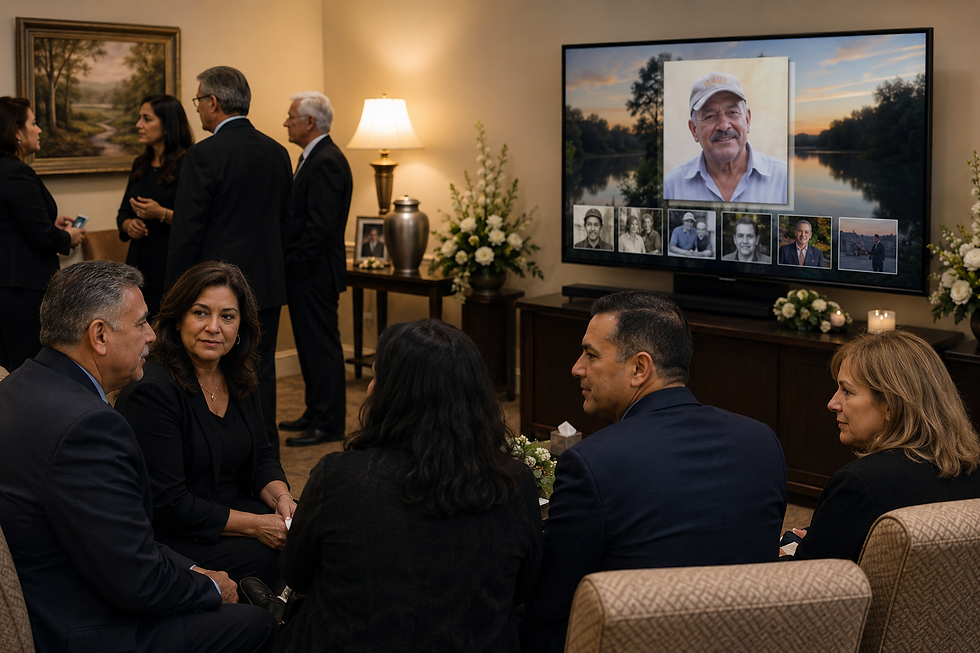
When someone we love passes away, there is an instinct to gather, to hold one another, to tell stories, and to remember together. The visitation is the heart of that instinct. As grief counselor and author Dr. Alan D. Wolfelt describes, mourning rituals are "symbolic activities that help us, together with our families and friends, express our deepest thoughts and feelings about life's most important events." A visitation is that ritual made tangible: drop-in, unhurried, and deeply human.
Within that gathering, a memorial slideshow video playing quietly in the corner does something a eulogy cannot. It shows a life, rather than describing one. It lets an old Army buddy recognize a young face from fifty years ago. It gives grandchildren a glimpse of the grandmother they never knew as a young woman. It opens conversations that might never have started otherwise.
This guide is written for families navigating that preparation — often in the span of just a few days, often while grieving. It focuses specifically on the visitation video, which has its own distinct character and requirements compared to the funeral or celebration of life video that follows.
Visitation vs. Funeral Videos: Understanding the Difference
Many families create one slideshow video and use it for everything. That works, but it means making compromises. Understanding what makes a visitation video distinct helps you design one that truly serves the moment.
Visitation Video | Funeral / Ceremony Video | |
Setting | Drop-in, conversational, background video sparks dialog | Seated, formal, front-and-center, video is a core component |
Length | 10–25 minutes (often longer) | 6–12 minutes |
Playback | Continuous loop for 1–3 hours | Plays once, with intention |
Audio | Often silent or very gentle instrumental | Music is more central |
Purpose | Spark conversation, honor the loved one broadly | Shared emotional moment among friends and family |
A visitation is a room in motion. Guests arrive at different times, pause near the screen, then drift into conversation. The Cremation Association of North America (CANA) notes that a wake or visitation remains a meaningful option regardless of whether a family chooses burial or cremation, and as cremation rates continue rising (projected at over 63% in 2025 by the National Funeral Directors Association), more families are designing custom, flexible memorial experiences where the visitation video carries more weight than ever.
Six Steps to Creating a Thoughtful Visitation Video
Step 1: Gather Photos from Across an Entire Life
The visitation video has a unique opportunity: because it runs long and loops, it can do justice to a full life, not just the recent decades that most mourners witnessed.
Start early, and cast a wide net. Reach out to siblings, children, cousins, former colleagues, and childhood friends. Ask them to text or email any photos they have, it is remarkable how many uncaptured chapters emerge. The 1960s baseball team photo. The honeymoon snapshot. The image from a job that no one in the room remembers.
A few practical notes on photo quality:
Slightly blurred or lower-resolution images are entirely acceptable. A moment matters more than megapixels.
For older printed photos, a smartphone camera held steadily above the photo in good light produces a perfectly usable digital copy. There is no need for a scanner.
Aim to represent distinct chapters: childhood, young adulthood, career, family, hobbies, and later years.
As Funeral.com notes in their memorial slideshow guidance, gathering images from different life stages helps distant family members and friends who may not have known the deceased well feel included in the story. For a visitation, where the room will include people from every chapter of a life, that breadth is especially meaningful.
Step 2: Consider the Order — Chronological or Shuffled?
For a ceremony video, chronological order creates a satisfying narrative arc: birth to end. For a visitation video, that logic is less important, and may even work against memory sharing in a drop-in setting.
Here's why: in a drop-in visitation, guests arrive continuously over one to three hours. If your video opens with baby photos and progresses chronologically, a guest who arrives an hour in may only ever see the final years. They miss the chapters that might have meant the most to them.
A shuffled or intentionally mixed order distributes the life more evenly across the loop. A guest arriving at any point encounters a cross-section: a childhood photo, then a family reunion, then a career moment, then a candid from last year. Every arrival gets a window into the whole person.
Look for a memorial video solution that offers a randomization or shuffle feature, rather than requiring you to manually drag-and-drop hundreds of photos into an arbitrary sequence. Memorial Video AI offers an AI-assisted photo sort that can help distribute images across different life periods, a meaningful time-saver when you are working against a short deadline while also grieving.
Step 3: Think Carefully About Music or the Absence of It
Music is powerful. In a visitation, that power can help, or it can complicate an already emotionally charged room.
When silence is the right choice: If the visitation is held in an intimate venue, a funeral home lounge, a small reception room, gentle music from the video can conflict with conversation, background ambient sound, or the family's preferred quiet. In these settings, consider removing audio from the video entirely, or simply muting the playback device. A slideshow of images needs no music to provide heartfelt remembrance.
When music adds something meaningful: In a larger venue, a sequestered viewing area, or a space with natural ambient noise, soft instrumental music can create a sense of warmth and continuity. Consider:
Gentle classical piano or acoustic guitar
Hymns or faith-based instrumentals, if appropriate to the family's tradition
Songs that were genuinely meaningful to the person, not just genre-appropriate filler
Memorial Video AI's song library includes instrumental and faith-based tracks selected specifically for memorial contexts including a "Silence & Sounds" option for families who prefer silence over music for their visitation.
Step 4: Make It Longer Than You Think You Need To
This is the step families most commonly underestimate.
A funeral video typically runs six to twelve minutes, long enough for two to four songs, short enough to hold a seated audience's attention. A visitation video operates in an entirely different context. It will loop for one, two, sometimes three hours. Guests will walk past it, pause, drift away, then return. It is background, foreground, and conversation prompt all at once.
A practical guideline: Aim for 10 to 25 minutes for a visitation video. Picture This Organized, a memorial planning resource, notes that reception-context slideshows of 10 to 20 minutes using 100 to 200 photos are common, and that the goal is to share as any highlight from their life and to include as many friends and family in the photos as appropriate.
What this means in practice:
Include more photos than you would for a ceremony video
Be liberal with what qualifies — group shots, hobby photos, candids, everyday moments
Think about guests who will be in the room: include photos that they might appear in, or that represent chapters of the deceased's life that they witnessed
This breadth also makes the video a lasting keepsake — something the family may return to for years.Memorial Video AI allows families to create and download multiple versions of their video to help them right size their memorial for every need.
Step 5: Set Up Video Looping Before the Visitation Begins
Looping seems like a small technical detail. The morning of a visitation is not the time to discover it is harder than expected.

Most modern video players make video ( MP4 file) looping straightforward:
Windows Media Player: Right-click the video in the playlist → "Repeat" — or enable the repeat icon in the playback controls
VLC Media Player (free, Windows and Mac): Media → Open File → check "Repeat One" or use the loop button in the player
Mac QuickTime: Does not loop natively from the player, but VLC is an easy free alternative
Smart TVs / HDMI sticks: Many allow USB playback with looping; check the settings menu under "Play Mode" or "Repeat"
A few tips for the day:
Test looping on the actual device and screen you will use at the venue, not just on your laptop at home
Export your video as an MP4 file, it is the most universally compatible format
Bring a backup on a USB drive and a second copy in cloud storage (Google Drive, iCloud, Dropbox) in case of hardware issues
Ask the funeral home or celebration of life venue if they have a preferred playback setup; many have AV equipment and staff experienced in exactly this
Step 6: Plan for Remote Mourners
A visitation is inherently in-person, but grief does not observe geography. There will be people who cannot travel: elderly relatives, distant friends, those with health challenges, those who simply cannot make the schedule work. They deserve to feel included too.
Once your visitation video is complete, consider:
Upload to a private or unlisted YouTube link and share it with family before the visitation
Vimeo allows password-protected video sharing, a bit of privacy for a tender moment
Google Drive or iCloud work well for sharing within a family circle
Some families use a private memorial page or tribute site to host the video alongside an obituary
Memorial Video AI makes it straightforward to export and share your finished video via their native streaming link. A link shared the evening before a visitation can let a grandchild in another country watch the same images that guests will see in person, a small act of inclusion that carries real meaning.
A Note on Preparation Time and Tools
There is nothing wrong with building a visitation video in PowerPoint or iMovie. Families have done it for years with love and care. But these tools were designed for other purposes, and in the days immediately following a loss, when time is short and emotional reserves are low, wrestling with software transitions, music timing, and export settings can feel overwhelming.
Newer memorial video tools are built specifically for this moment. Memorial Video AI was created after its founder experienced firsthand how difficult it was to prepare a meaningful tribute while also grieving. The platform handles photo upload, ordering assistance, music selection from a memorial-appropriate library, and MP4 export, without requiring any video editing experience. It is designed to let families focus on the memories, not the mechanics.
Closing Thoughts
A visitation video is not required. A visitation is about presence, not presentation. The people in the room matter far more than what is playing on the screen.
But done thoughtfully, a memorial slideshow can enrich those hours in ways that linger. It honors the breadth of a life that no single guest fully witnessed. It gives people something to gather around, to point at, to cry over and laugh about. It does quietly what a visitation is meant to do: remind everyone in that room of the person they have in common, and why they came.
If you are preparing one in the days ahead, be gentle with yourself. Gather what you can. Include what you have. The imperfect photo of a beloved face is always worth including.
Memorial Video AI helps families create professional-quality memorial slideshow videos without editing experience. Learn more at memorialvideo.ai.
Additional Resources:
Frequently Asked Questions
Q: How long should a visitation memorial video be?
A visitation video is typically 10 to 25 minutes long, significantly longer than a funeral or ceremony video, which usually runs four to eight minutes. The extended length is intentional: visitations last one to three hours, with guests arriving continuously throughout. A longer video ensures that someone who arrives an hour in still encounters a full cross-section of the loved one's life, not just the final chapter of a chronological loop. When in doubt, err on the side of more photos rather than fewer. The video is also a keepsake the family will return to long after the service, so breadth matters.
Q: Should a visitation video have music, or should it play silently?
It depends on the venue and the family's preference, and either choice is completely appropriate. In a smaller, more intimate room where guests are actively talking and sharing memories, silence (or very low ambient sound) often works best; music can compete with conversation and feel intrusive. In a larger venue, a sectioned viewing area, or a space with natural background noise, soft instrumental music adds warmth without overwhelming the room. If you are unsure, design the video with a music track but plan to mute playback at the venue and see how it feels. Many families find that quiet images looping in the background, no sound at all, are deeply moving on their own.
Q: What is the difference between a visitation video and a funeral video, do I need both?
You do not need both, but they serve genuinely different purposes. A funeral video is typically shorter (four to eight minutes), plays once as part of a structured service, and is designed for a seated audience experiencing a shared emotional moment together. A visitation video is longer, loops continuously, plays in the background of a drop-in gathering, and is designed to spark individual memories and conversations as guests come and go. Many families create one video and use it for both, which works fine. Families who want to honor both moments fully often create a shorter, more curated version for the ceremony and a longer, broader version for the visitation — a meaningful but manageable extra step.
Q: How do I loop a memorial video to play continuously during a visitation?
Yes — a phone is entirely sufficient for gathering photos and uploading them to a memorial video service. Most families collect photos from multiple relatives via text message, and both Apple Photos and Google Photos make it straightforward to organize them into a dedicated album. Where a phone can struggle is in the actual video creation step: traditional editing apps like iMovie or CapCut require time and some comfort with video tools, which many families simply do not have in the days following a loss. Purpose-built memorial video platforms like Memorial Video AI are designed to be fully mobile-friendly — you upload your photos, select a music track, and the platform handles the assembly, transitions, and export. No editing experience required, and the finished MP4 can be downloaded and shared directly from your phone.


Comments