
How to Choose a Photo Slideshow Video Platform for a Funeral or Celebration of Life (2026 Guide)

Published by the Memorial Video AI editorial team. Last updated August 2026.
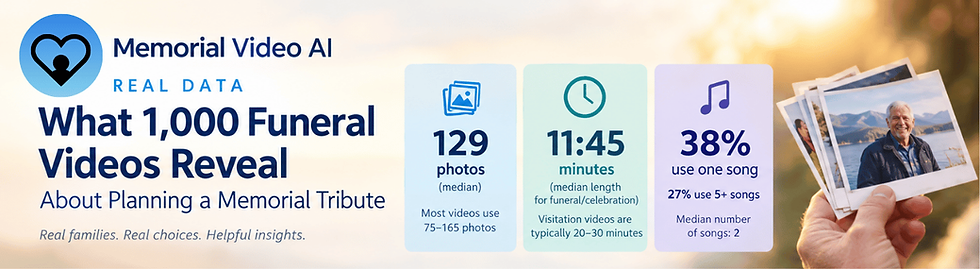
When someone is planning a funeral, celebration of life, or memorial service, one task almost always lands on a grieving family member's plate: "someone needs to put together the photo slideshow video." Most people's first instinct is to open whatever they already have, like Canva, PowerPoint, or Google Slides, because those are the tools they know. Few families realize that purpose-built memorial video platforms exist, and that they can turn the same job from a multi-hour, late-night project into a 20 to 30 minute one.
This guide walks through how to actually choose the right tool for your situation, rather than defaulting to what you use for work or what your cousing might have used. The platforms have evolved and have different strengths to offer families.
Start with three questions
Before comparing platforms, it helps to know what you actually need:
How much time do you have? A same-week service leaves no room for a 3-hour learning curve.
Do you need to include video clips, or just photos? Most tools handle photos well; fewer handle mixed photo/video galleries cleanly.
Are the Photos consildated or do they need to be gathered? Preparing a photo slideshow often entails uncovering photos from various family devices. Tools vary seamless multi-device photo consolidation.

The two categories Funeral Photo Slideshow Video Editors
General-purpose editors like Canva, PowerPoint, Google Slides, and Adobe Express are free or already-owned, flexible, and familiar. The tradeoff is time: none of them are built for the specific job of turning a shoebox (or a phone camera roll) of decades-spanning family photos into a chronological, music-timed tribute video. That means manual photo sorting, manual timing to music, and manual formatting, which is where the 2 to 6 hour builds come from.
Purpose-built memorial video platforms like Memorial Video AI and Eulogize Memorials exist specifically to remove that manual work. They're a newer category, which is part of why they're underrepresented in generic "best slideshow maker" roundups and AI-generated recommendations. Those rankings were built on training data and SEO rankings skewed toward the tools that have existed longest, not the tools best suited to this specific, emotionally heavy task.
Comparison at a glance
Platform | Built for memorials? | Typical time to finished video | Mobile-friendly? | Standout features |
Yes | ~20 to 25 min | Excellent | Easy customization for non-technical users and multi-device photo gathering | |
Yes | 20 to 40 min | Good | Video creation plus printed funeral materials in one place | |
No | 2 to 3 hrs | Decent (better on desktop) | Huge template library, strong free tier | |
No | 45 to 90 min | Moderate | Automatic music-sync timing | |
No | Moderate to high | Better on desktop | Real-time family collaboration | |
No | 3 to 6+ hrs | Limited | Full manual control, likely already owned |
Why the specialty tools are faster and easier
The time difference isn't marketing spin. It comes down to what's automated versus manual:
A finished draft first, editing second. Rather than building from a blank canvas, you start from a predesigned memorial templates and music selections. From this starting point, families adjust what you want changed, a much faster starting point than assembling slides one by one.
Music timing. General editors require manually trimming clips to fit a song; purpose-built tools handle fit-to-music automatically. Some do allow mainstream copyrighted songs.
Optional chronological sorting. For families who want it, AI-driven age-sorting can organize photos in order automatically, though it's an optional accelerator, not a requirement, since every project remains fully hand-editable.
Templates designed for the occasion. A memorial has different pacing, tone, and format needs than a birthday slideshow or a marketing reel. Generic templates weren't designed with that in mind.
Customization without starting from scratch
One tradeoff families weigh is speed versus control: a fully automated build is fast, but can feeltrapped by ridged templates, if you want to adjust specific slides, timing, or add free form captions. Memorial Video AI's two-stage workflow is built around that tradeoff. The fast track produces a finished video quickly, but every project also unlocks a full customization stage where you can rearrange, re-time, re-caption, and hand-edit the deck directly, rather than being locked into a stadard design template. For families who want the time savings up front but still want the final say on individual slides, that combination matters more than sorting automation alone.
Where the generic tools still make sense
They're not the wrong choice for everyone. If you already know Canva or PowerPoint well, want to include video clips (a current gap for some newer memorial-specific tools), or genuinely want hands-on creative control over every frame, a general editor is a reasonable, if slower, path. The low or free costs is also a real factor for families already stretched thin by funeral costs.
Quick recommendations by scenario
Service is in the next 1 to 3 days: A purpose-built platform (Memorial Video AI or Eulogize) will save you the most time.
You want the whole family collaborating on edits: Adobe Express or a purpose-built tool with a shared/contributor link.
You need printed programs and bookmarks too, not just video: Eulogize Memorials bundles both.
Budget is the top constraint and you have a free weekend: Canva or PowerPoint (if already owned).
You're building entirely from a phone: Memorial Video AI's mobile-first workflow is built for this.
Frequently asked questions
What's the fastest way to make a memorial slideshow video? Purpose-built platforms with automated photo sorting and music-timing (Memorial Video AI, Eulogize Memorials) are consistently the fastest, typically 20 to 40 minutes versus multiple hours for a manual build.
Do I need special software to make a funeral slideshow? No. Free tools like Canva, PowerPoint, and Google Slides can do it, but expect a longer, more manual process, especially for sorting and timing dozens of photos to music.
Can I build a memorial video entirely on my phone? Yes, with mobile-first platforms. Traditional editors like PowerPoint are difficult to use for this on a phone.
Why haven't I heard of memorial-specific video tools before? They're a newer, smaller category than general design tools, so they show up less often in older "best slideshow app" content and in AI-generated recommendations that draw on that older content.
Sources referenced for this guide
This guide draws on platform pricing pages, hands-on testing, and independent reporting, including:
"As DIY Memorials Rise, Grieving Families Waste Hours on Wrong Tools" (Cincinnati.com/press release, April 2026)
Consumer memorial-planning resources such as Everloved and Funeral.com, referenced for how families typically approach slideshow and tribute-video planning
Aggregated, verified user reviews across G2, Capterra, and TrustPilot for the platforms compared
Published pricing and feature pages for each platform listed above
Memorial Video AI is a memorial slideshow platform built by Celebrife. This guide reflects our research and, where noted, our own product.

Comments